Cra 0.1.1528 October 2026
Make Cra’s icon your own
Pick a different app icon for Cra, or use any image you like. The New Tab button can sit above your tabs, a reopened tab goes back into the folder it came from, and Cra can now import from Helium.
Choose Cra’s icon
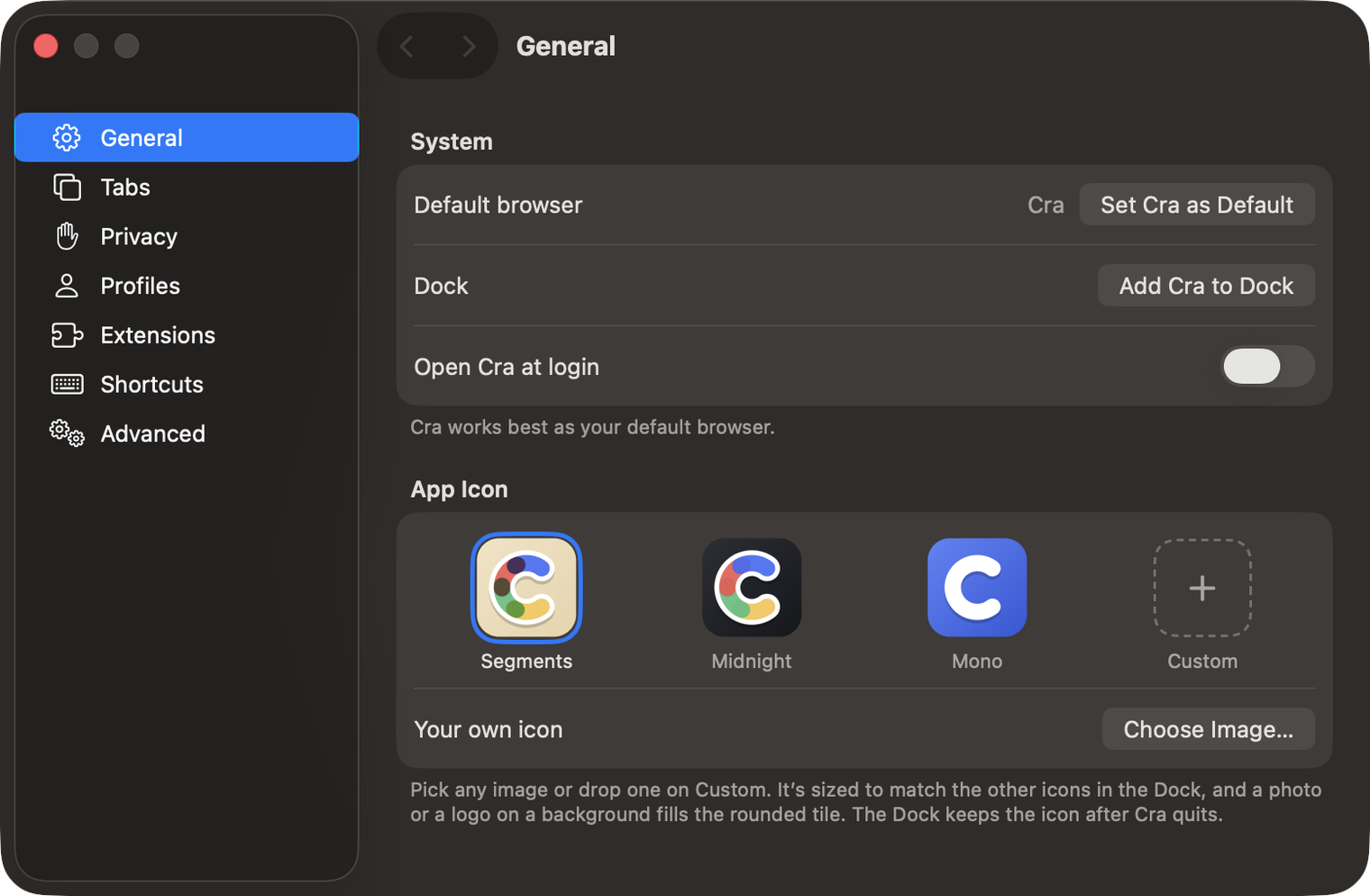
Settings ▸ General ▸ App Icon has three icons to choose from (Segments, Midnight and Mono), or use an image of your own: click Choose Image… or drop it on Custom. Cra sizes it to match the other icons in the Dock, whether it’s a finished app icon, a logo or a photo, and the Dock keeps it after Cra quits.
The New Tab button can lead your tabs
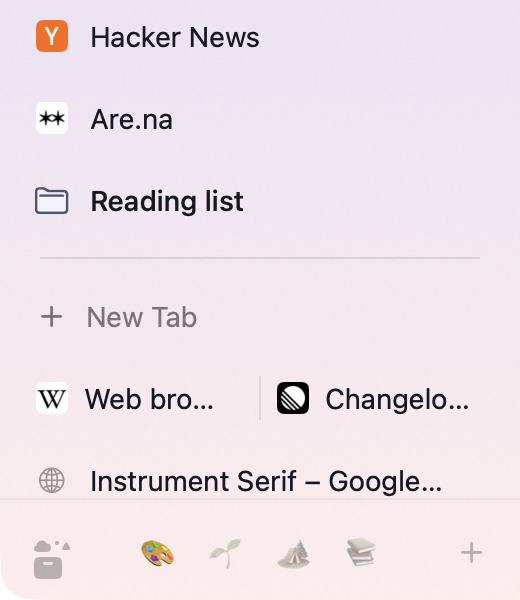
Turn on Settings ▸ Tabs ▸ Show the New Tab button above tabs and + New Tab sits at the top of Today, right under your pinned tabs, instead of after your last tab. Dragging a tab above your first tab still puts it at the top.
What else is new
Reopened tabs go back into their folder
⇧⌘T and the archive in the Library used to put a closed tab back in Today or at the end of your pinned tabs. Now it goes back into the folder it was closed from, in its old place, as long as that folder is still there. A pull request you closed from a GitHub live folder comes back into the live folder.
Import from Helium
Helium joins the browsers Cra can import from: tabs, bookmarks, history, passwords, sign-ins and extensions, like the other Chromium browsers.
Scrolling after a space swipe
After you swiped between spaces, scrolling a page could stop dead the moment you lifted your fingers instead of gliding to a stop. Every new scroll now starts fresh.
For every change in 0.1.15, see the changelog.
Past releases
27 October 20260.1.14
The Library moves into the sidebar

27 October 20260.1.13
Drag your spaces into order

27 October 20260.1.12
Downloads that outlive their tab

27 October 20260.1.11
Your passwords, locked in your Keychain

26 October 20260.1.10
Air Traffic Control

26 October 20260.1.9
Favorites per space
- 0.1.8
26 October 20260.1.8
Video everywhere
- 0.1.7
26 October 20260.1.7
Work sign-ins

26 October 20260.1.6
Drag and drop that works

26 October 20260.1.5
Sign in with Google

26 October 20260.1.4
Copy, paste and clean corners

26 October 20260.1.3
Extensions that reach their apps
- 0.1.2
26 October 20260.1.2
Notarized, and it updates itself
- 0.1.1
25 October 20260.1.1
Quit fix

25 October 20260.1.0
Early access